 CoachPro Tools
When the client is a company, not a person
Working with one person and working with an organisation are two different jobs. With an individual client, a wheel or a test in session is enough. With a team of sixty people spread across four departments, you need something else: everyone has to answer, nobody can fear being identified, you have to read the results area by area, and leadership needs a report that makes sense without you in the room. For a side-by-side look at assessment platforms, read CoachPro Tools vs Coachmetrix.
That is what the Organizations module solves. It is not another tool in the catalogue: it is a separate module, in the Working with groups section of the menu, with its own 19 instruments for diagnosing teams and companies.
How it is organised: company, departments, people and measurements
Everything hangs from the organisation. Inside each one you work with three tabs:
- Departments. The areas where you want to read results separately: Sales, Operations, Technology. They are optional: without departments, you can still measure everything together.
- People. Only needed for a 360, because they are the person being assessed. In a climate survey nobody gets registered.
- Measurements. Each time you apply an instrument. You can repeat the same measurement every six months and compare them.
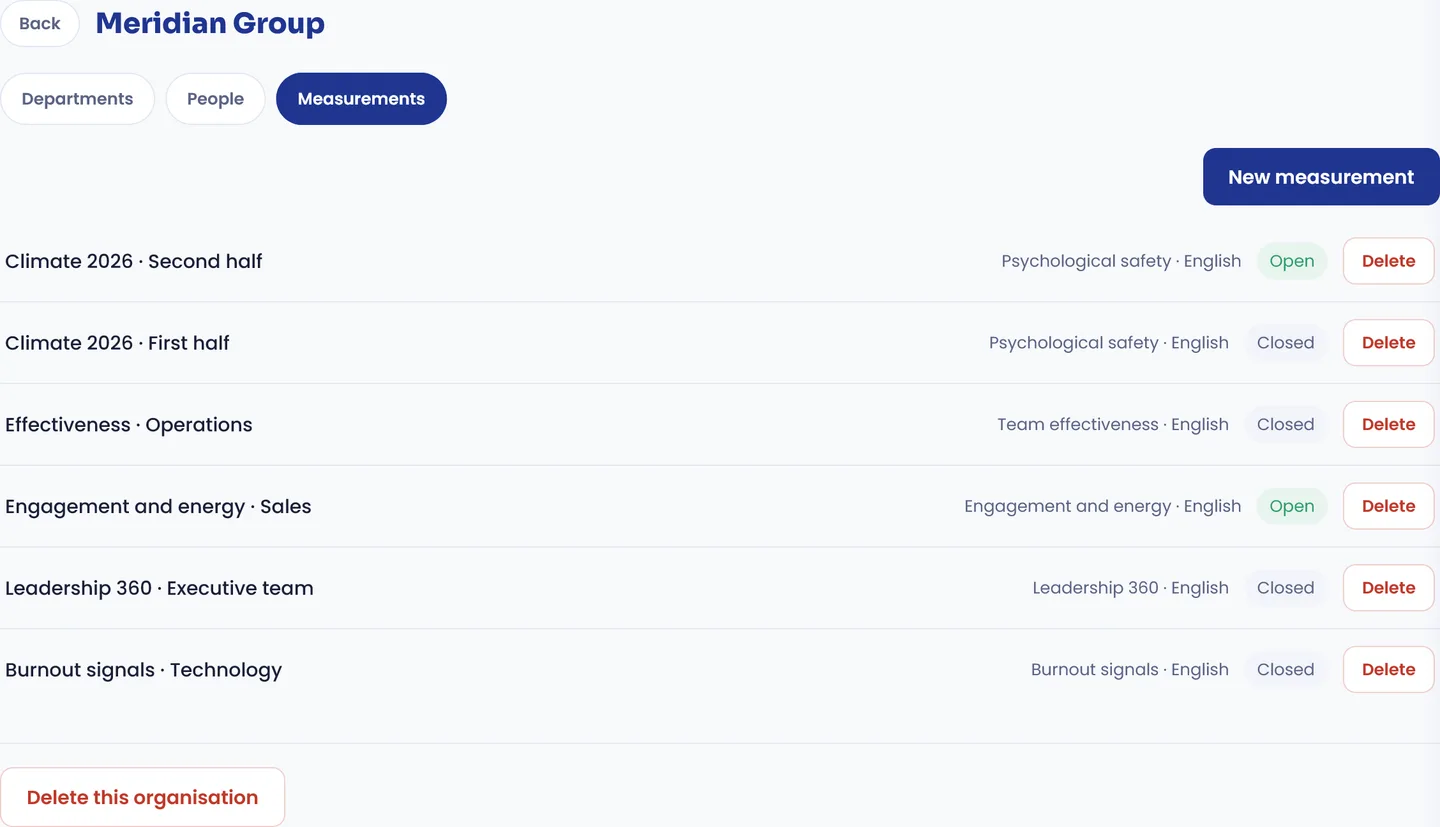
An organisation's measurements: the same instrument repeated every six months, a different one for each area and a 360 for leadership.
What you can measure
The 19 instruments cover what a team coach usually needs to diagnose, including: psychological safety, team effectiveness, trust and dynamics, meetings and decisions, team agreements, engagement and energy, belonging and inclusion, demands and resources, burnout signals, turnover risk, 30-60-90 onboarding, readiness for change, organisational culture, lived versus stated values, direct manager effectiveness and a leadership 360. All of them exist in English and Spanish, and you choose the language for each measurement. For exercises to run with the team itself, see team coaching tools.
Creating a measurement: the three decisions that matter
When you create a measurement you choose the instrument, the language and two things that define how the people answering are protected:
The minimum number of answers to publish figures
Below that number, a group shows no figures at all. If a four-person department answers a climate survey, its results would say too much about each of them. With the minimum, that department appears as "Not enough answers" and its data is not published.
Anonymous answers
On by default. And with a rule that genuinely protects participants: if it is switched off, the measurement stops being anonymous for good. There is no way to promise anonymity and take it back later.
The links to answer
One link per group. The link knows which department the person answering belongs to, so there is no need to ask, and that question, "which area do you work in?", is exactly the one that makes people stop feeling anonymous. Nobody needs to create an account to answer.
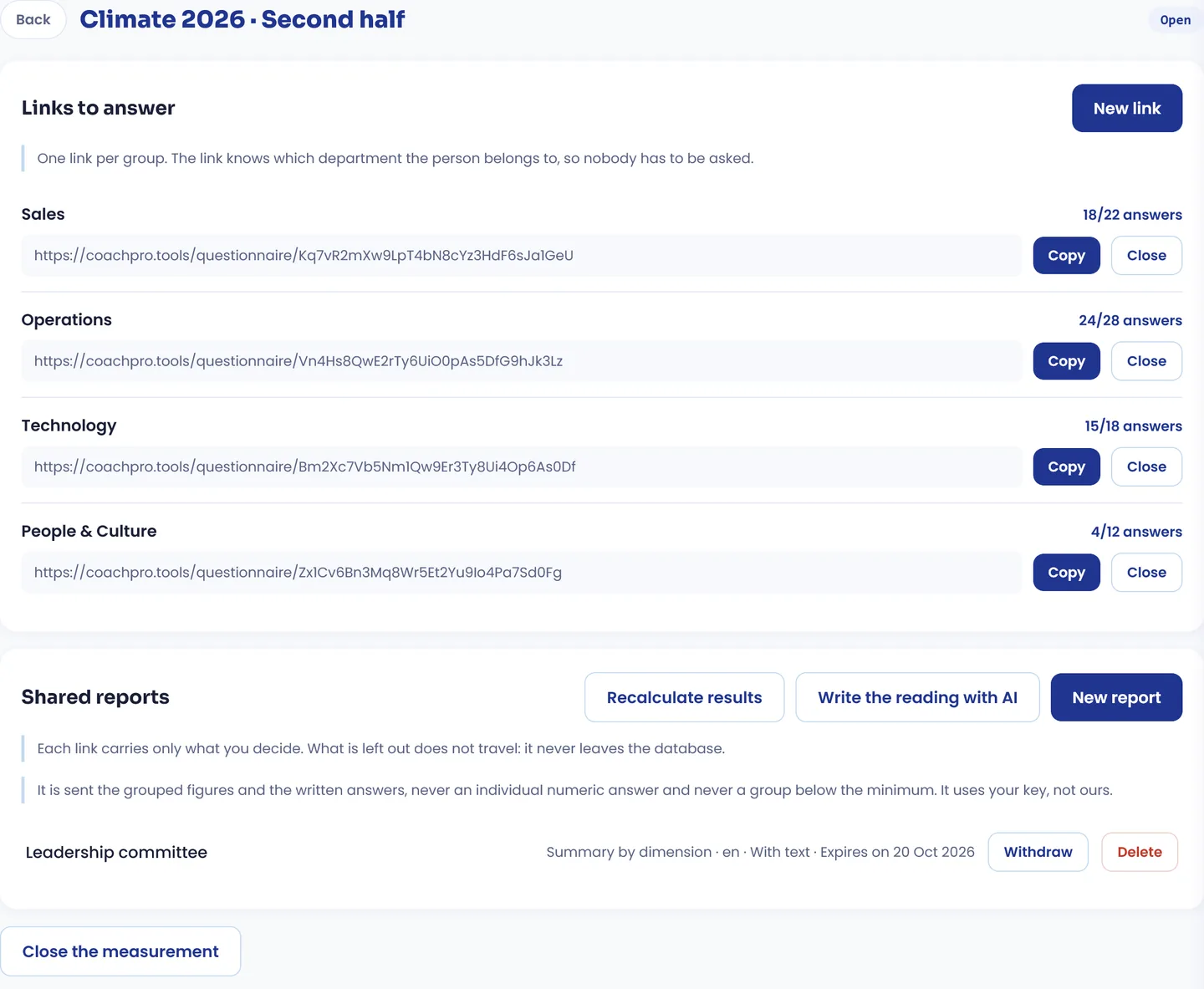
An open measurement: one link per department, the answers each one has against those expected, and the shared reports.
Each link shows how many answers it has against the number expected (18 of 22, 24 of 28), and you can close it and reopen it. When the deadline passes, you close the measurement and it stops accepting answers.
The special case: the 360
A 360 does not measure a group, it measures one person. That is why here you do register the person being assessed, and create one link for each person who answers about them. Each link knows in what capacity they answer: the person themselves, their manager, their peers, their team or others. That way the report separates self-perception from what others see.
Reports: each audience sees what you decide
This is the part that takes the most care. Results are not downloaded into a spreadsheet that ends up forwarded to the whole company: they are shared through reports, and each report is a link for one specific audience. The rule is written on the screen itself: each link carries only what you decide, and what stays out never leaves the database.
For each report you decide:
- How much it shows: a summary by dimension, the full question-by-question detail, or just their own department. The report for the leadership committee and the report for the head of Operations do not need to be the same.
- Which departments it includes. With none ticked, the whole organisation.
- The written answers. They appear exactly as written, only if the group reaches the minimum number of answers, and it is never possible to know who wrote each one.
- The comparison with the previous measurement of the same instrument. Only figures that reached the minimum both times are compared.
- When it expires: never, after 7, 30 or 90 days. And you can withdraw it at any time: whoever has the link stops seeing the report.
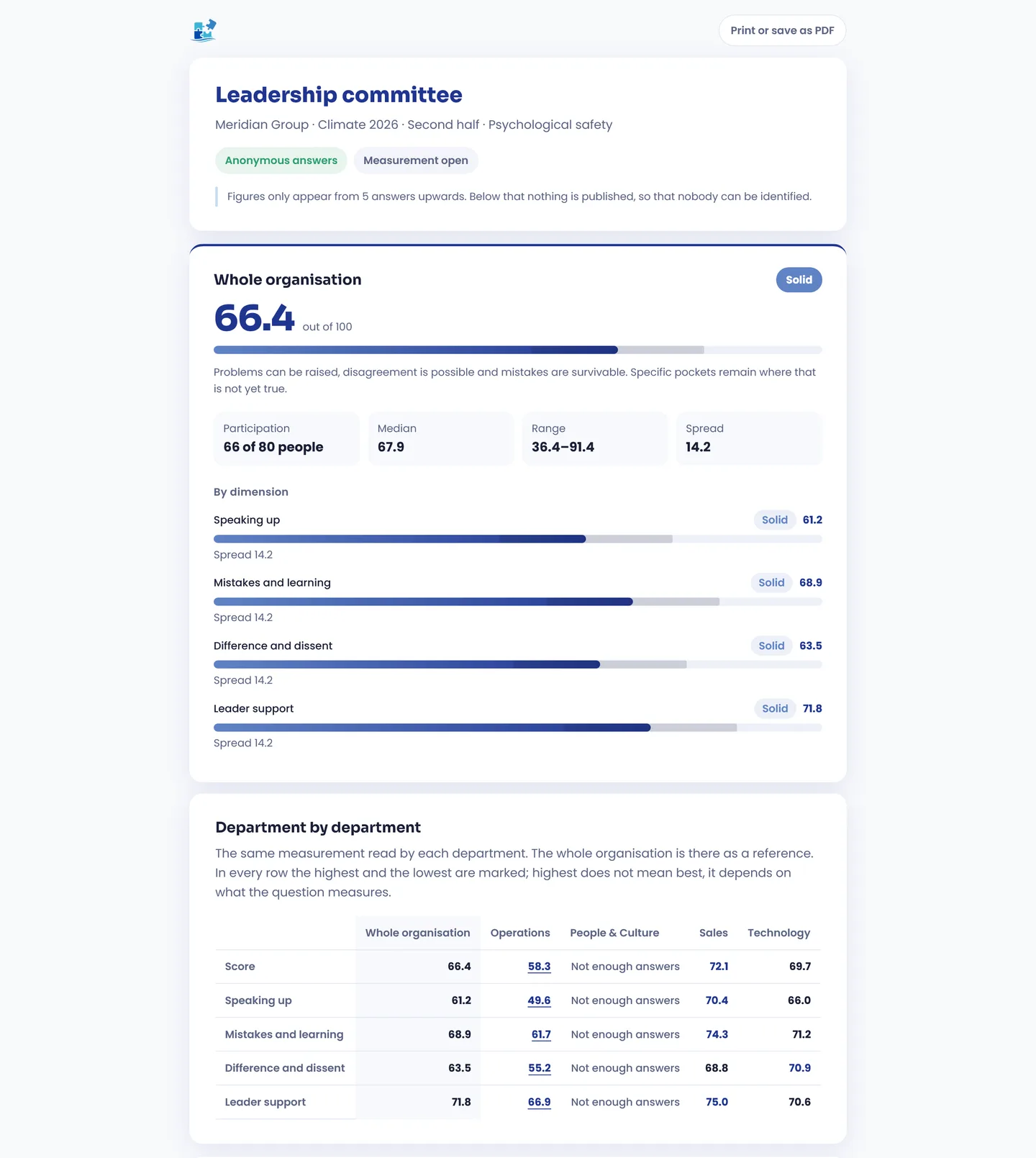
What leadership receives: the score with its band and meaning, the four dimensions and a department-by-department reading. People & Culture does not reach the minimum and publishes no figures.
The report does not stop at a number. Each score comes with its band and what it means, in the company's own language: in psychological safety, 66.4 is "Solid", and the screen explains it: problems can be raised, disagreement is possible and mistakes are survivable, but specific pockets remain where that is not yet true. Below that, participation, the median, the range and the spread, and the department-by-department table, which marks the highest and lowest figure in each row.
Whoever receives it can print it or save it as a PDF from the report itself. And if you have White Label switched on, the report carries your logo and your colours.
Why this way of sharing matters: the biggest risk in a climate diagnostic is not the data, it is who receives it. A small department with a bad score, visible to the whole leadership team, is a person singled out. The minimum number of answers and reports per audience are what let you promise anonymity and keep that promise.
The written reading with AI, using your own key
If you want a first draft of the interpretation, the Write the reading with AI button drafts it from the results, and you can include it in reports. It works with your own AI key, the same one you set up in AI Recaps: CoachPro does not provide one. And what gets sent is limited: the figures already grouped and the written answers, never an individual numeric answer or any group below the minimum.
Team diagnostics, inside your platform
Organizations, programs, the interactive tools in the catalogue, CRM and scheduling, in a single account.
See plans and pricing →A process from start to finish
1. You add the organisation and its departments
Once. They serve every measurement you run afterwards.
2. You create the measurement and hand out the links
One link per department. The company forwards them through its internal channel, and you see in your panel how many answers each one has.
3. You close and recalculate
With the measurement closed, you recalculate the results and, if you want, ask for the AI draft of the reading.
4. You share one report per audience
A complete one for whoever hired you, one per department for each manager. And the feedback session works from the report, not from an opinion.
5. You measure again
Six months later, the same measurement. The report compares it with the previous one and shows whether what was worked on really moved. To design what happens between one measurement and the next, see how to build an action plan with your client.

The point of measuring a team is not the report: it is the conversation the report makes possible.
Conclusion
Coaching teams and organisations demands something individual coaching does not: measuring many people at once without exposing anyone, and giving the results back to the right people and only to them. The Organizations module is built around that demand: links that already know the department, a minimum below which nothing is published, anonymity that cannot be withdrawn halfway, and reports that carry only what you decide. For one-to-one diagnostics, see diagnostic assessment in coaching.
Discover CoachPro Tools →