 CoachPro Tools
Your method deserves better than a PDF
Almost every coach with a few years of practice has a tool of their own: a questionnaire they put together for the second session, a wheel with their own areas, a test they refined client after client. It usually lives in a Word file or a PDF. The client prints it or fills it in by hand, emails it back, and you do the maths and the chart by hand. If you do them at all.
Tools from a catalogue, however good, belong to someone else. Yours is the one you know best, the one you know how to read and the one that sets you apart. CoachPro Tools gives you two ways to bring it into the platform, alongside the other interactive tools:
Both end in the same place: a tool of your own, inside the platform, that your client answers online and that no longer depends on someone doing the maths by hand.
Route 1: the Tool builder
The Tool builder sits in the side menu, in the Tools group. Its promise fits in one line: build your own diagnostic tool, with scaled questions and a result with bars and a radar. There is no code to write and no chart to design: you provide the content and the platform takes care of the rest.
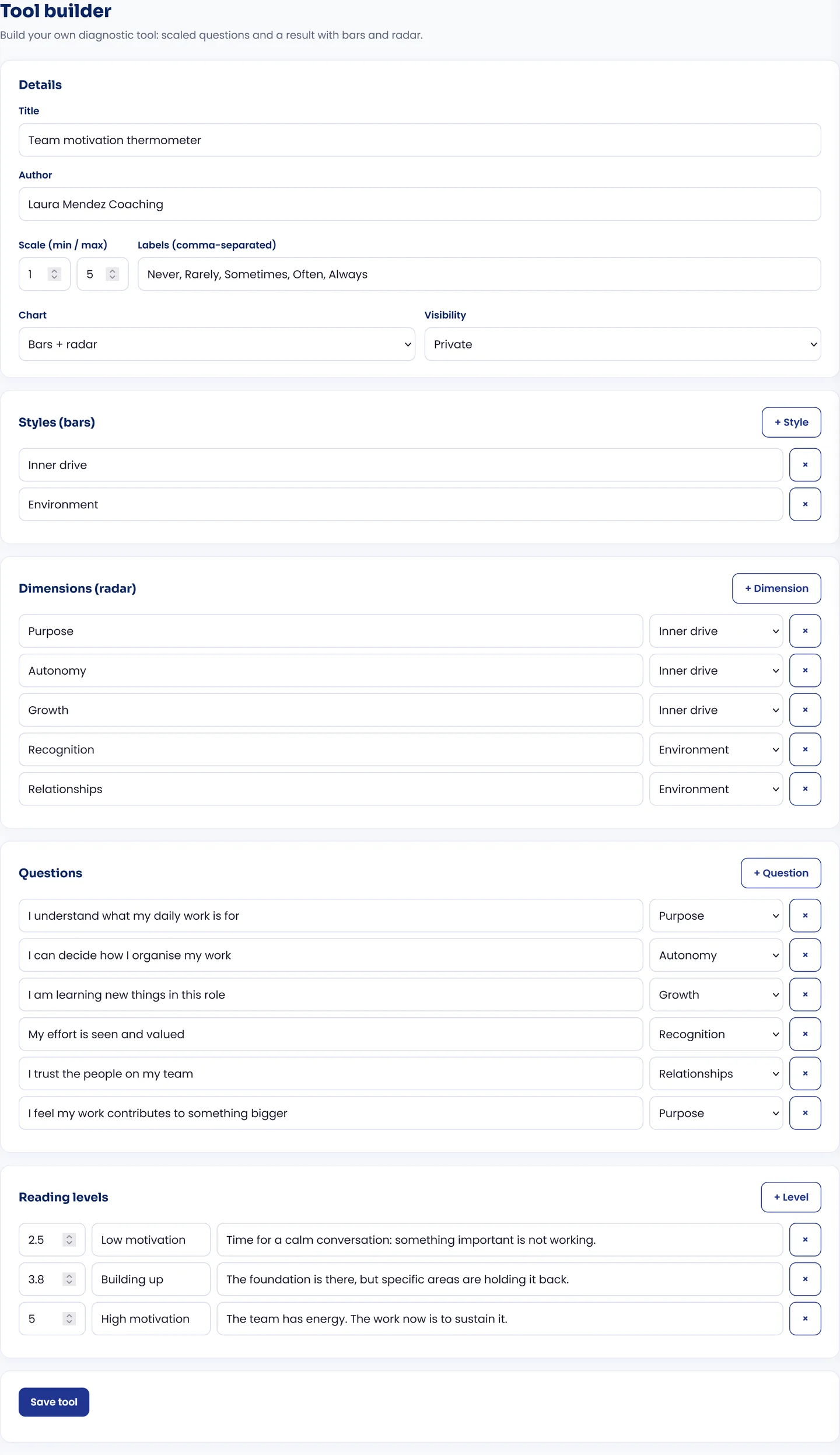
A team motivation thermometer built in the Tool builder: five dimensions, two styles and three reading levels.
How it comes together, block by block
1. Details
The title, the author (your name by default) and the scale: the minimum, the maximum and a label for each point, for example "Never, Rarely, Sometimes, Often, Always". You also choose the result chart (bars, radar or both) and the visibility: private, just for you, or shared, so it appears under "Created by coaches" and other coaches can use it.
2. Styles (the bars)
The big blocks you want to measure. In the example, "Inner drive" and "Environment". Each style is one bar in the result.
3. Dimensions (the radar)
The pieces of each style. Purpose, Autonomy and Growth hang from inner drive; Recognition and Relationships, from the environment. Each dimension is one axis of the radar.
4. Questions
Statements the client rates on your scale, each one assigned to a dimension. "I understand what my daily work is for" feeds Purpose; "My effort is seen and valued", Recognition.
5. Reading levels
What the client reads at the end, based on their overall score. You set a ceiling, a title and a text: up to 2.5, "Low motivation"; up to 3.8, "Building up"; up to 5, "High motivation". It is your interpretation, written once and delivered every time.
The platform does the maths, with a rule you can explain to your client: each dimension is the average of its questions, each style is the average of its dimensions, and the reading level comes from the average of all the answers.
What your client sees
Once the tool is saved, you assign it to a client and it appears in their space, which they open with their link, with no username or password. They answer the questions, press "See result" and get this:
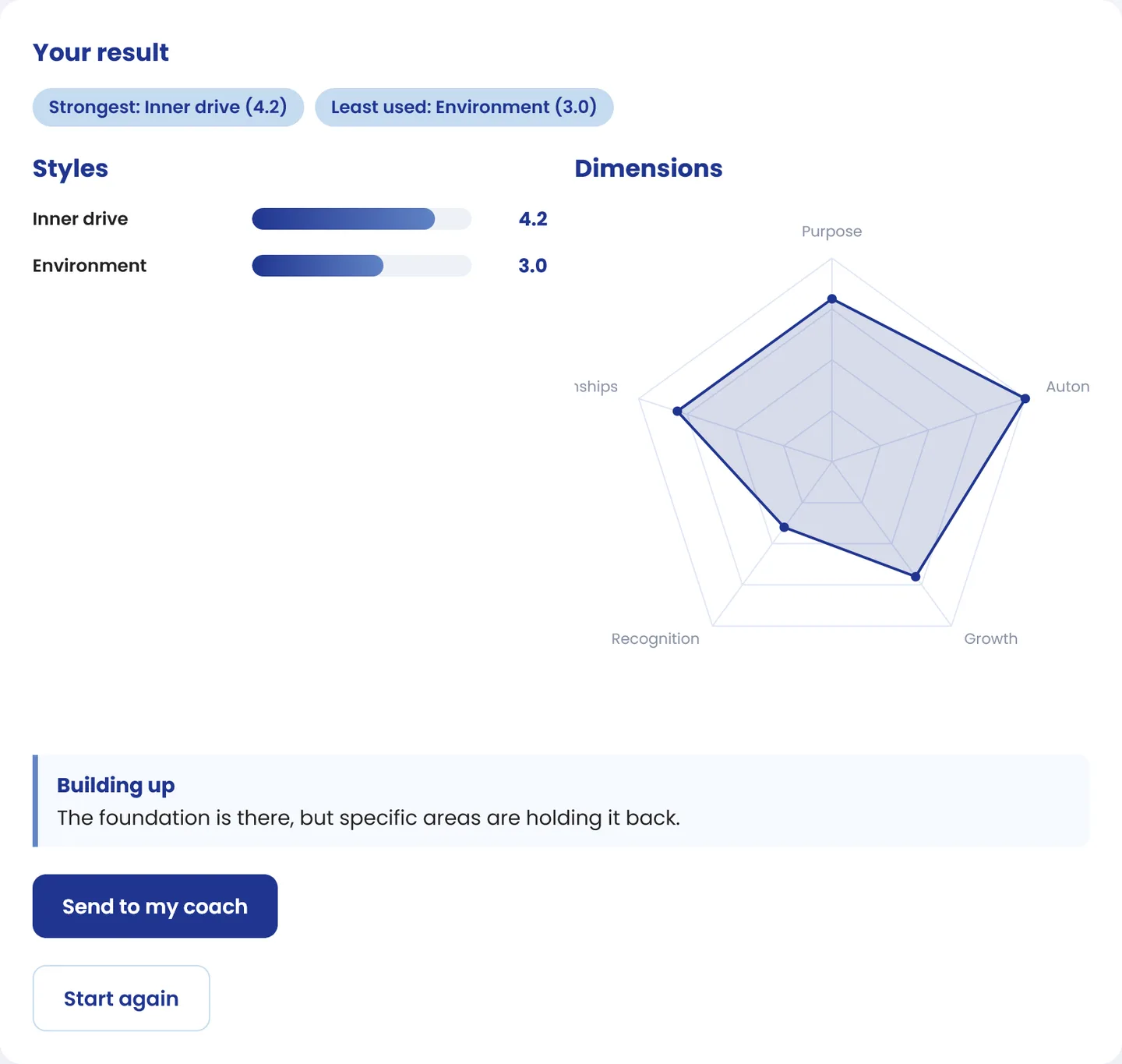
The result: strongest and least used style, the bars, the radar and the text for the matching level. One button sends it to their coach.
At the top, two tags summarise the profile: the strongest style and the least used. Below, the bars per style and the radar per dimension. At the end, the reading level you wrote. And the "Send to my coach" button, which saves the result so you have it before the next session.
What it does in practice: the client arrives at the session having already thought about the topic, and you arrive knowing where to start. In the example, the session does not open with "how is the team doing?", but with "your recognition score is 2: tell me what is going on there".
Which tools it suits, and which it does not
The Tool builder makes diagnostics made of scaled questions: thermometers, self-assessments, profile tests, before-and-after checks. If your tool asks for something else, like drawing, sorting cards or writing long answers, it is not a job for the Tool builder. It is a job for route 2.
Creating and editing tools with the Tool builder is available on the Lifetime plan or with White Label.
Your method, inside your platform
The Tool builder, the interactive tools in the catalogue, CRM, scheduling and your clients' space, in a single account.
See plans and pricing →Route 2: Upload my tool
If your tool already exists in a file, or if it is not a scaled questionnaire, there is no need to rebuild it yourself. With the Upload my tool button you send it to us and we build it inside the platform, with your colours and your brand. At no extra cost.
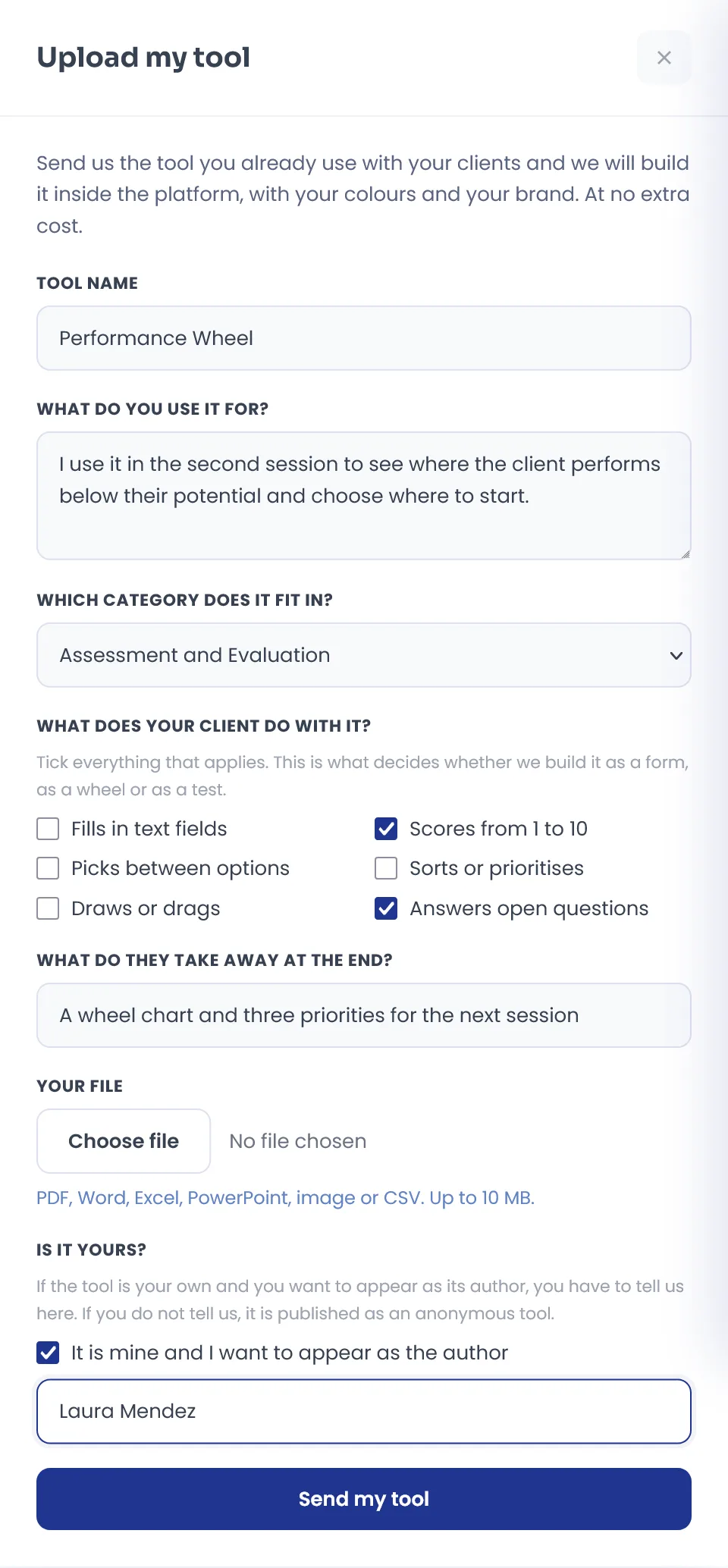
The complete form. Each question helps us build it the way you use it.
What we ask, and why
- Tool name and what you use it for: at what point in the process it comes in and what you want the client to discover.
- Which category it fits in, from the catalogue's categories, or the one you would give it if none fits.
- What your client does with it: fills in text fields, scores from 1 to 10, picks between options, sorts or prioritises, draws or drags, answers open questions. This is what decides whether we build it as a form, as a wheel or as a test.
- What they take away at the end: a PDF, a chart, a score, an action plan.
- Your file: PDF, Word, Excel, PowerPoint, image or CSV, up to 10 MB.
- Is it yours? If the tool is your own and you want to appear as its author, you tick the box and write how you want your name to appear. If you do not tell us, it is published as an anonymous tool.
When you send it you get the confirmation: "Received. We will review it and write to you as soon as it is ready." From then on, the work is ours.
A coach sent us a workbook in Word for analysing strategic risks from a SWOT. We built it as a seven-step interactive tool, with the SWOT crossings, a score for each risk and a bar chart built from what the client writes. The author's name appears inside the tool.
Which one suits you
| Tool builder | Upload my tool | |
|---|---|---|
| Who builds it | You | We do |
| Type of tool | Scaled questions | Form, wheel, test or another mechanic |
| Result | Bars, radar and reading by level | Whatever your tool needs |
| When it is ready | When you save it | When we write to you |
| Starting point | Your questions | Your file: PDF, Word, Excel, PowerPoint, image or CSV |
| Plans | Lifetime or White Label | At no extra cost |
A simple rule: if your tool is a questionnaire that gets scored, the Tool builder has it ready today. If it is anything else, or you would rather not spend the time, send it to us.

Most coaches' own tools start in a notebook. What changes is where they end up.
What your practice gains from a tool of its own
Your method becomes visible
A client who answers your thermometer, with your name as the author, understands they are working with someone who has a method, not someone who improvises. It is part of what justifies your rates, a topic we cover in how to charge more as a coach.
You stop doing the maths by hand
The averages, the bars and the radar come out on their own. Your time goes into reading the result with the client, not calculating it.
The work between sessions actually happens
The tool reaches the client's space and comes back to you with one button. We explain it in detail in the coachee platform: between-session tasks with no account.
You can measure before and after
The same tool at the start and at the end of a process gives you a comparison on your own dimensions. More ideas in how to measure your client's progress between sessions.
Conclusion
Your tool is probably the most personal thing you have as a coach, and also the thing that is worst stored. The Tool builder turns it into an interactive diagnostic in the time it takes you to write the questions; Upload my tool turns it into whatever it needs to be, without you touching a thing. Either way it ends up in the same place: inside your platform, in your client's space and back with you, with the result.
Discover CoachPro Tools →